Does Tabletop take over my application?
No. Laravel keeps the models, policies, validation, queues and business logic. Tabletop owns the admin screens, not your architecture.
Public beta · Open source
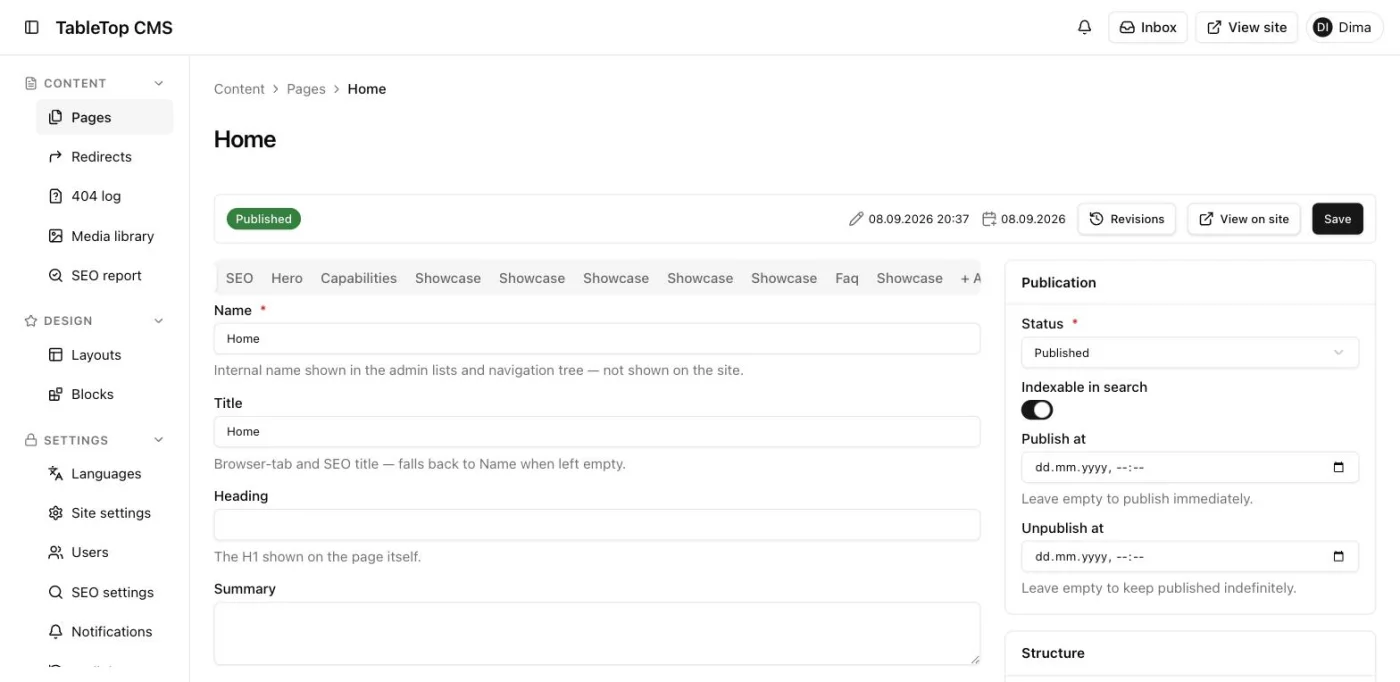
Describe pages, tables, forms and actions in a PHP DSL; Tabletop renders them as a React admin. We build every client project on it, and our own CMS — closed beta today, public next.
composer require tbtop/adminMIT licenceLaravel 11–13PHP 8.4+Self-hosted
$s->select('city_id')->label('City')->dependsOn('country_id')->query(fn (array $deps, string $search) =>City::query()->where('country_id', $deps['country_id'])->where('name', 'like', "%{$search}%")->limit(20)->pluck('name', 'id')->all())->creatable([$s->text('name')->required()],fn (array $data) => ['value' => City::create($data)->id,'label' => $data['name']],),
Every team that ships a Laravel product hits this choice. Tabletop exists because we hit it twice.
Fast first release. Then overrides, vendor patches and a UI runtime that still thinks your product is a set of resources.
Then
You fight the tool to reach your product.
Total freedom. Then you rebuild tables, forms, validation, permissions and loading states — and drift away from Laravel.
Then
You rebuild the tool to reach your product.
Author in PHP like the first. Render and extend in React like the second. Laravel stays the owner of models, policies, queues and validation.
Then
You describe the product. The tool stays out of the way.
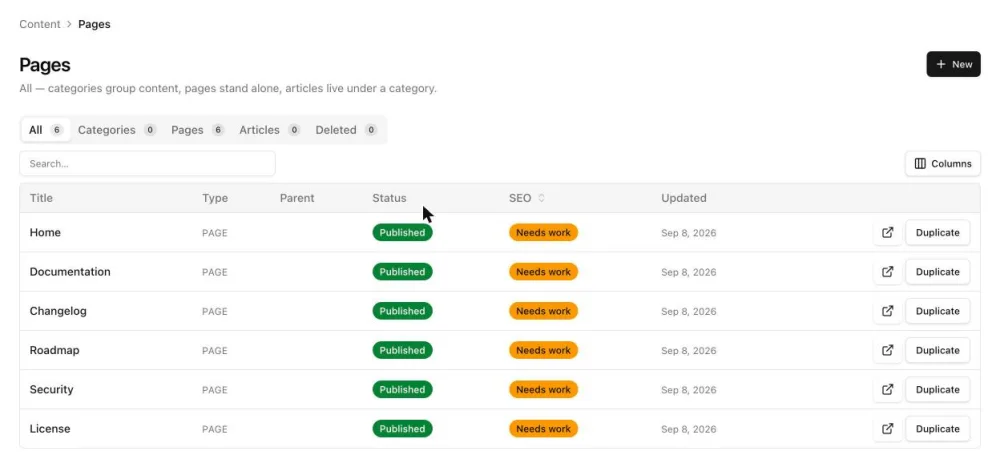
A page is a PHP class. It serializes to a typed JSON contract, and the React client renders that contract over Inertia — the same runtime that draws every screen in our CMS.
class PagesPage extends Page{public function view(S $s): Node{$table = $s->table('pages')->query($this->query(...))->columns([Column::make('name')->label('Title')->translatable()->emphasized(),Column::make('display_state')->label('Status')->formatUsing($this->statusLabel(...))->badge(['Published' => 'success',]),])->tabs([$this->tab('all'),$this->tab('pages'),])->searchable(['pages.name'])->defaultSort('sort_key', 'asc')->rowActions([$this->duplicateAction($s),]);return $s->stack([$table]);}}
Every layer of Tabletop exists because a real project eventually demanded it. The line continues into what we are building next.
Our first products shipped in weeks on a ready-made Laravel admin. It was the right tool for a first release.
The products grew and every screen got more specific. Soon most of the work went into bending the admin, not into features.
Live previews, custom fields, real UI state. And a second codebase, drifting away from the Laravel app that already owned the models, auth and validation.
AvailableBeta
The synthesis: PHP-first authoring, a React runtime, Laravel as the owner of both.
In progressBeta
tbtop/admin is public and MIT on GitHub. Every tbtop/cms screen, from pages and blocks to revisions, scheduling and SEO, is ordinary builder DSL.
See the CMSIn progress
Contacts, deals and pipelines on the same builder.
Planned
Catalogue, orders and customers.
Roadmap, not a promise: order and scope change with real projects.as of September 2026
Full roadmapNine things the builder carries so your team does not have to write them, or go looking for a plugin on the second day.
PHP and React share one schema. Contract tests catch it when the two sides disagree.
The two sides can't drift apart silently.
The declarative subset of your Laravel rules ships to the client for on-blur checks. The server stays the only boundary.
No second copy of the rules in JavaScript.
A custom field, widget or page is one React component you use from PHP by name.
Extend without forking the package.
A component reads the unsaved form in the browser and redraws on every change.
No request per keystroke.
Sidebar, top bar, navigation groups, the ⌘K command palette and notifications are authored in PHP. Several panels, each with its own guard, prefix and locales.
One language for the whole admin.
Mark a field translatable and it gets per-locale tabs, with rules per locale if you need them.
Multilingual content is the norm, not a plugin.
A library with folders and image variants, and a picker field that plugs into any form.
One less package to choose and wire.
Filter tabs, grouping, drag-to-reorder, inline-editable cells, row and bulk actions.
Most of an admin is tables.
The authoring guide is written for an AI agent and verified against source.
Your first page in minutes, with an agent or without.
Register a component once and use it from PHP like any built-in — a field, a block inside a layout, a live widget over form state, or a whole page. No fork, no patching the package.
01 / 04
Write one React component for a field type the DSL doesn't ship. Use it from PHP by name, with its own options, next to the 26 built-in field kinds.
Both sides ship in the same commit.
02 / 04
Drop a custom component into a table, a section or any other layout, right next to the built-in fields around it.
The PHP side stays the single source of truth for the page.
03 / 04
Read the form as the manager types — a running total, a counter, a preview — without a request per keystroke.
The server still computes the number that gets saved.
04 / 04
Some screens are not a form or a table. Declare a page, hand it a custom component, and it slots into the admin like any other page.
Same navigation, same permissions, same admin shell.
No. Laravel keeps the models, policies, validation, queues and business logic. Tabletop owns the admin screens, not your architecture.
Not for ordinary screens: tables, forms and actions are PHP. React is for the field, widget or page your product needs and the builder does not ship.
Filament renders on the server with Livewire, under MIT; Nova is Laravel's own paid admin, built on Vue over Inertia. Both are mature — Filament is on its fifth major, Nova has shipped since 2018 — and each has things Tabletop, a pre-1.0 beta, does not: Filament a directory of over a thousand plugins and built-in multi-tenancy, Nova built-in login with optional 2FA. Tabletop suits teams whose product already speaks React: screens are still authored in PHP, but a custom field, widget or page is a React 19 component.
Yes. tbtop/admin is a standalone package; the CMS, and later CRM and Store, are separate packages written in the same DSL.
MIT for tbtop/admin and tbtop/cms. tbtop/admin is on GitHub; tbtop/cms is private during the closed beta, with access through the waitlist. Both install as Composer packages: no hosted service, no per-seat fee.
PHP 8.4 or newer and Laravel 11, 12 or 13. On the client, React 19 over Inertia 3. It is in public beta at v0.5: until 1.0, pin the minor version and read the changelog before you upgrade.
Your Laravel application, models and data stay exactly where they are. Tabletop is a dependency, not a platform you migrate onto.
Publish the config, run php artisan admin:install and do the four steps it prints, then register a panel and scaffold the first page with make:tbtop-page. Everything else is the Laravel app your team already runs.